Early access development is underway for growing customer-support and engagement teams. Request access

Business communication, organised

Manage business conversations from one connected workspace

Krishaa Konnect is being built to help teams organise customer conversations, contacts, templates, campaigns and workflows for businesses using the WhatsApp Business Platform.

A product of Krishaa Tech InnovationsCurrently in early-stage product development

Product concept preview

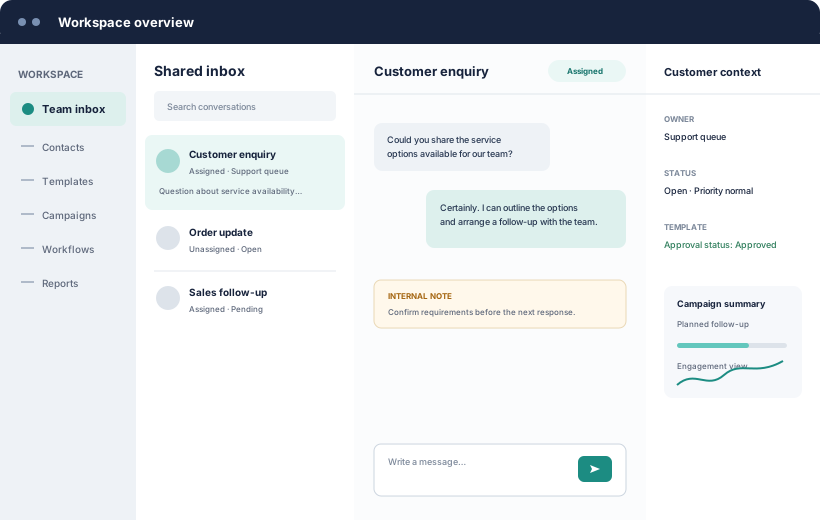
Concept preview of a Krishaa Konnect shared inbox with conversations, customer context and assignments
Shared team workflows
Clear access control
Responsible data handling
Designed for business use

The operational gap

Business conversations become harder to manage as teams grow

Individual devices may work at first. They do not provide the ownership, context and oversight a coordinated team needs.

Scattered conversations

Customer history can remain tied to individual devices or team members.

Unclear ownership

Teams cannot easily see who is responsible for the next response.

Delayed responses

New enquiries can wait when queues and priorities are not visible.

Lost follow-ups

Manual reminders make important next steps easy to overlook.

Inconsistent communication

Without shared templates and context, answers can vary across a team.

Limited manager visibility

Leaders may lack a clear view of workload, status and response patterns.

Difficult handovers

Changes in ownership often require repeating context or searching old threads.

Incomplete audit history

Decisions and access changes are difficult to review without a shared record.

A connected workspace

Put context, ownership and activity in one operating view

Krishaa Konnect is designed around the work a team does before, during and after a customer conversation.

See all capabilities
In development
Shared inboxQueues, status and assignment
Customer contextProfiles, consent and history
Team coordinationNotes, handovers and roles
Operational visibilityActivity, reporting and audit history

Designed as one system

Templates, campaigns, workflows and workspace controls are planned as connected capabilities—not isolated tools.

  • Role-based permissions
  • Multiple workspace support
  • Consent information
  • Controlled integrations

Core product areas

Practical structure for everyday customer communication

In development

One inbox for the whole team

Bring incoming business conversations into shared queues where ownership and status are visible. Reduce duplicate replies and make handovers easier to follow.

  • Assign conversations to a person or queue
  • Track open, pending and resolved work
  • Keep internal coordination separate from customer replies
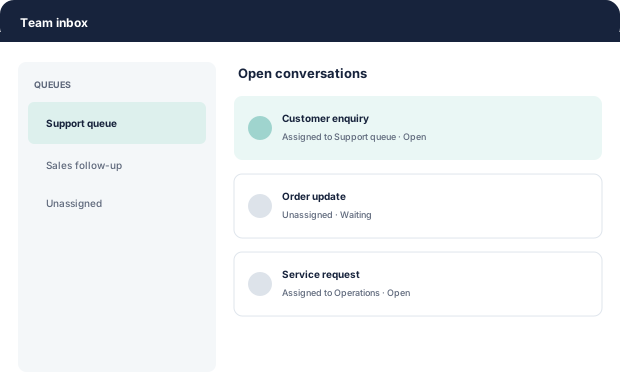
Concept view of shared team inbox queues and conversation assignments
In development

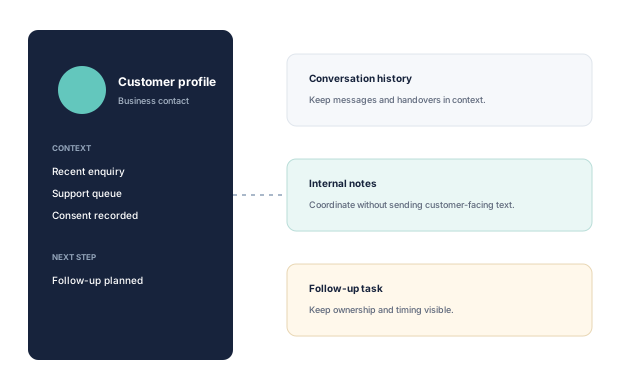
Keep customer context organised

Build a consistent view of each business contact, including conversation history, internal notes, recorded consent information and planned follow-ups.

  • Reduce repeated questions during handovers
  • Keep relevant business context near the conversation
  • Make ownership and next steps easier to understand
Concept view connecting a customer profile with conversation history, notes and follow-up tasks
Planned

Coordinate follow-ups and workflows

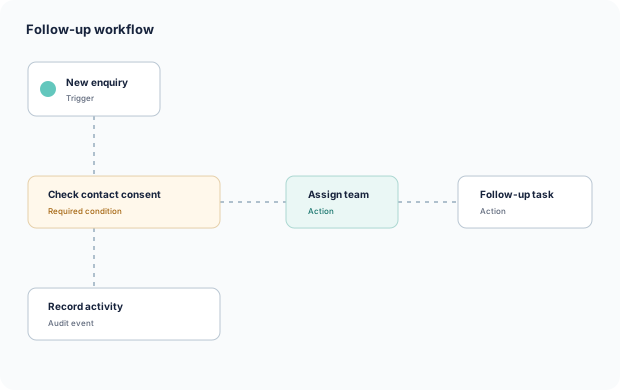
Structure repeatable actions around enquiries, consent checks, team assignment and follow-up tasks. Messaging remains subject to applicable Meta and WhatsApp policies.

  • Define event-based actions and conditions
  • Keep required checks visible in the process
  • Record activity for operational review
Concept workflow showing an enquiry, consent check, team assignment and follow-up
Planned

Maintain visibility and control

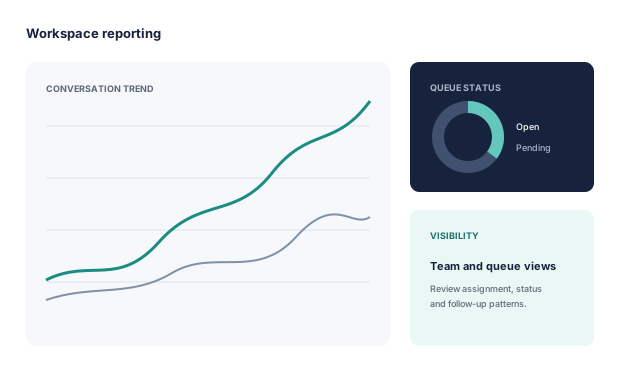
Review queue activity, assignment patterns and operational status without relying on invented vanity metrics. Reporting is planned to support practical team oversight.

  • View activity by workspace, queue and team
  • Review access and configuration changes
  • Use reporting to identify workflow gaps
Concept reporting view with conversation trends and queue status

How it is intended to work

A clear path from setup to shared operations

Create your workspace

Set up the business context, operating structure and initial preferences.

Connect your business account

Use supported connection options as they become available during rollout.

Invite your team

Add authorised users and align their access with their responsibilities.

Organise conversations

Coordinate ownership, context, follow-ups and team activity.

Connection options and supported capabilities will depend on the product rollout and applicable Meta requirements.

Potential use cases

Communication workflows that need shared ownership

These examples describe intended applications of the product, not confirmed customer deployments.

Explore solutions

Customer Support

Route questions and keep resolution context visible.

Sales Enquiries

Coordinate initial responses and planned follow-ups.

Appointment Reminders

Plan consent-aware administrative reminders.

Order Updates

Organise transactional status communication.

Service Notifications

Coordinate useful, timely operational notices.

Lead Follow-up

Keep responsible, consent-aware next steps visible.

Multi-location Operations

Separate workspaces while maintaining oversight.

Team Collaboration

Support cleaner handovers, notes and ownership.

Security and trust

Designed with responsible access and data handling in mind

Security decisions are being considered throughout product development. Specific controls will depend on deployment stage and final infrastructure arrangements.

Tenant-level data separationWorkspace boundaries designed to reduce unintended access.
Role-based permissionsAccess aligned with a person’s responsibilities.
Controlled accessAdministrative actions limited to authorised users.
Audit historyImportant access and workflow activity intended to be reviewable.
Encrypted transportData designed to move through protected network connections.
Secure credential handlingSensitive integration material designed for controlled storage.
Retention controlsOptions intended to support appropriate information lifecycles.
Deletion handlingA documented path for verified deletion requests.
Least-privilege accessSystems and people should receive only necessary access.

Pricing preview

Plans intended to match different operating needs

Commercial terms are still being defined. No prices are being published during early product development.

Compare plans

Starter

For small teams establishing a shared workflow.

Pricing to be announced

  • Shared inbox
  • Contact management
  • Basic templates
  • Basic reporting
Contact us

Growth

For larger teams coordinating repeatable activity.

Pricing to be announced

  • Campaign management
  • Workflow automation
  • Advanced assignment
  • Enhanced reporting
Contact us

Business

For organisations requiring control across workspaces.

Pricing to be announced

  • Multiple workspaces
  • Advanced permissions
  • Audit history
  • Integrations
Contact us

Enterprise

For tailored onboarding and governance needs.

Contact us

  • Security review
  • Retention options
  • Dedicated support
  • Custom integrations
Contact us

Meta or WhatsApp messaging charges, taxes and applicable third-party charges may be billed separately.

Questions, answered

What to know during early development

What is Krishaa Konnect?

Krishaa Konnect is a multi-tenant business communication and customer engagement platform being developed by Krishaa Tech Innovations for organisations using the WhatsApp Business Platform.

Is Krishaa Konnect owned by Meta or WhatsApp?

No. Krishaa Konnect is an independent product. It is not owned, endorsed or currently certified by Meta or WhatsApp.

Is the platform currently available?

The product is in early-stage development. Businesses can request early access, but availability and supported features will vary during rollout.

Can multiple team members use it?

Shared team access, assignment and role-based permissions are core parts of the product design. Final limits and plan availability will be confirmed as development progresses.

Can businesses connect an existing business number?

Connection options are being evaluated and will depend on supported onboarding flows, eligibility and applicable Meta requirements. Meta-hosted Embedded Signup integration is planned.

Are Meta messaging charges included?

Not necessarily. Meta or WhatsApp messaging fees, taxes and third-party charges may be billed separately from any Krishaa Konnect subscription or service fees.

How is customer information handled?

The platform is being designed with workspace separation, controlled access, data minimisation and documented retention and deletion processes. Read the Privacy Policy and security approach for more detail.

How can information deletion be requested?

Email contact@krishaakonnect.com with the subject “Data Deletion Request”. The full verification and review process appears in our Data Deletion Instructions.

Are campaigns and automation planned?

Yes. Campaign management and workflow automation are planned capabilities. Their availability, limits and policy requirements will be confirmed during rollout.

How can a business request early access?

Use the early-access enquiry form or email contact@krishaakonnect.com with information about your team and intended use.

Build a more organised customer communication workflow

Tell us about your team and how you currently manage business conversations.

Request Early Access